Register an OLT
Goal: register an OLT in Cpehub, informing how the system should access it (console and SNMP), and validate the connection.
Registering the OLT is the step that gives Cpehub "eyes" on your network: from there it discovers the ONUs, reads signals, and receives events. It's one of the first things to do during deployment.
Prerequisites
Check off items as you confirm them. This is just a visual aid, so reloading the page unchecks everything again.
- The VPN between your network and Cpehub is online (the system needs to reach the OLT's IP).
- OLT's management IP (IPv4 or IPv6).
- Console access: SSH or Telnet, port, username, and password (and enable password, if any).
- SNMP: port (default 161) and the read-only community.
- Certified manufacturer/model — see certified manufacturers.
Step by step
-
Go to OLTs and click + Add OLT.

-
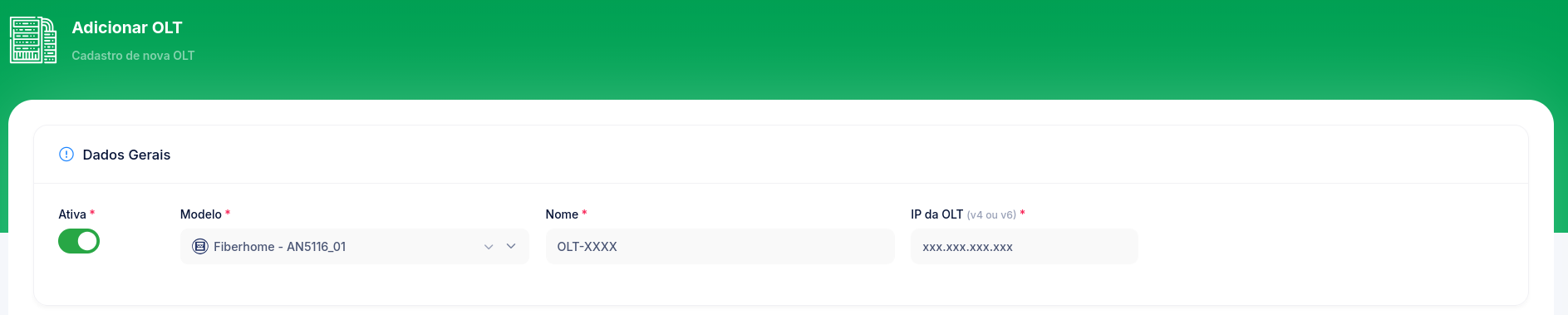
General data:
- Active — leave it on for the OLT to go into operation right away.
- Model — select the OLT model.
- Name — a name that identifies the OLT (e.g.,
OLT-Downtown). - Pin to an ERP — optional. If filled in, this OLT's CPEs will query only the chosen ERP, ignoring the cascade. Leave it on "Use cascade (all ERPs by priority)" if you don't have a specific reason not to.
- OLT IP — the management IP (v4 or v6).
-
Console Access (SSH/Telnet):
- Connection — SSH or Telnet.
- Port — default 22 (SSH) or 23 (Telnet).
- OLT's Username and Password.
- Enable access password — optional, if the OLT requires it.
- Click Test to validate console access before saving.

-
SNMP:
- Port — default 161.
- Community (Read Only) — the OLT's read community.
- Click Test to validate SNMP.

-
Once the tests pass, click Register.

Expected result
The OLT appears in the OLT list. The connectivity badges (SSH / SNMP / TRAP) indicate the status of each channel. Cpehub then starts discovering the connected ONUs.
Registration enables SSH and SNMP, but to receive real-time events (down/up) you need to configure SNMP Trap on the OLT itself pointing to Cpehub. See the per-manufacturer tutorials in OLTs.
Common issues
| Symptom | Likely cause | Solution |
|---|---|---|
| Console "Test" fails | Wrong IP/port/credentials or VPN offline | Check the data and whether the VPN tunnel is online |
| SNMP "Test" fails | Wrong community or SNMP blocked on the OLT | Check the read-only community and the firewall |
| OLT registers but doesn't discover ONUs | Model/driver or permissions | See Test the OLT connection |
| Red TRAP badge | SNMP Trap not configured on the OLT | Configure the trap (manufacturer tutorial) |