Creating the WireGuard VPN
Let's create a WireGuard VPN directly through the system. The VPN can be used for communication between Cpehub and the provider's OLTs, or between the ACS and the provider's CPEs.
Step by step
Follow the steps below to create the VPN in the Cpehub system
-
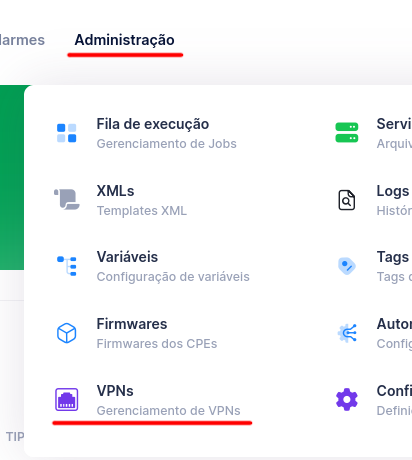
Go to the Administration -> VPNs menu
-
Click the + Add VPN button

-
Fill in the fields with the following information:
| Field | What to enter |
|---|---|
| Name | VPN identification name |
| Type | Select WireGuard |
| Server | Select the server where this VPN will be used — Cpehub: communication between the system and the OLTs; ACS: communication of the TR-069 server with the CPEs |
| VPN Active Switch | Keep it active |
| Remote IP (ISP Equipment) | Enter the Public IP where the VPN will connect at the ISP |
| Remote Port (ISP Equipment) | Enter a port where the VPN will connect at the ISP |
| Remote Networks (ISP internal networks) | Enter the ISP's internal networks that will be accessed through the VPN |
| Connectivity Test Remote IP | Enter an internal ISP IP that accepts ICMP (ping) and is reachable through the VPN — this IP will be used to test whether the VPN is operational |
Configuration example:
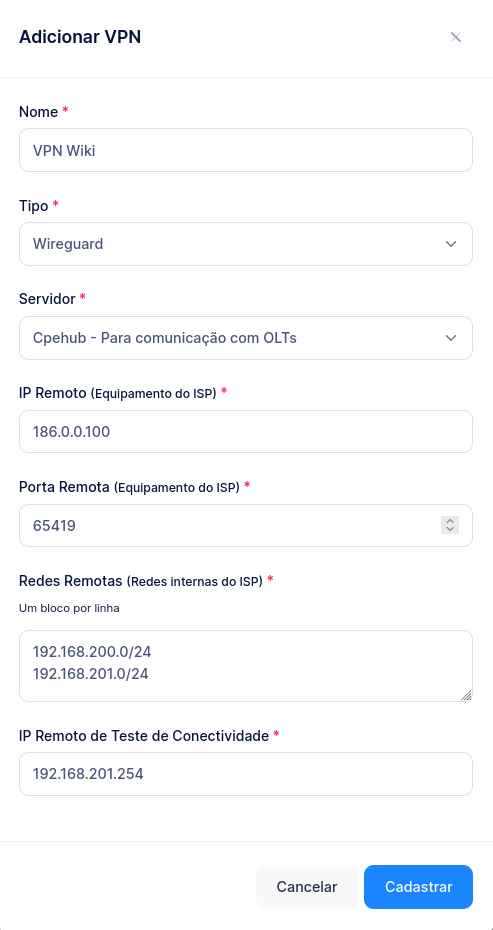
- Click Register
The VPN will be created on the selected server. Now you need to configure the VPN on the ISP side: